




Get your virtual WhatsApp Business number today
- Get instant access to WhatsApp Business now
- £6.99 + VAT monthly. No contract, cancel any time.
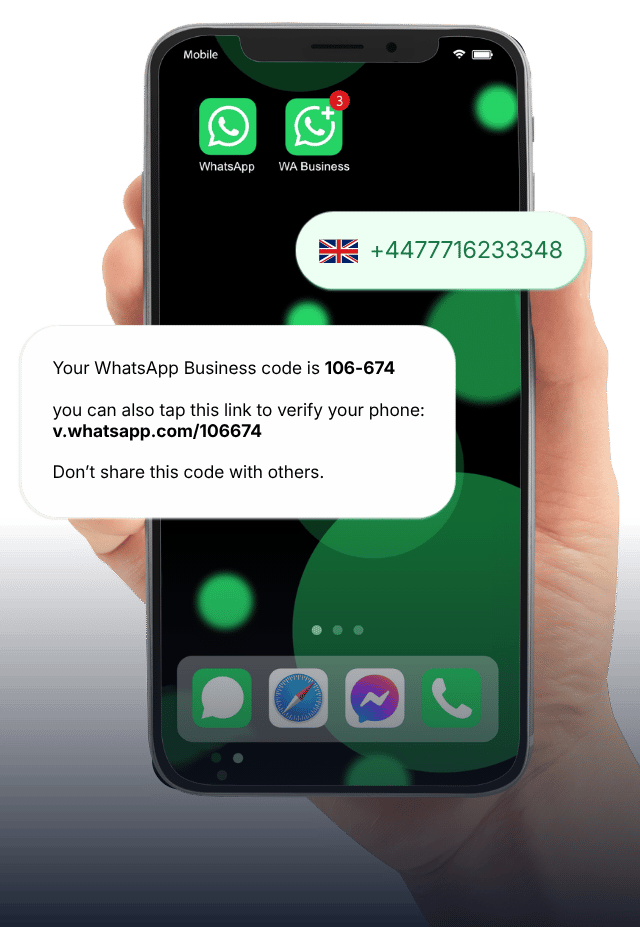
Three Clicks. One Number
We can deliver a second number to your mobile in just 3 easy steps. Simple!

Generate a Number
Generate a number on our website and receive via SMS in just 10 seconds.

Download WhatsApp
Download the WhatsApp Business App either from Google Play Store or App Store.

Verify your number
When requested, put your new business number in and verify. Done.
Get your Virtual Whatsapp Business Number today
Did you know that to access WhatsApp Business you need a second number? You’re probably thinking that’s a real hassle, right? Wrong.
With YourBusinessNumber we can deliver a second number to your mobile in just 3 easy steps. Simple.
Continue to use your existing mobile to access all the benefits of WhatsApp Business with none of the hassle of a second phone.
- Split out your work and professional life for a better balance on the same single phone
- Get a unique phone number to use for your business (pick your area code)
- Easy access to support and guaranteed number verification with WhatsApp Business

Who do we provide second numbers to?
Unlocking the power of WhatsApp Business for every professional need.
Estate Agents
Provide your lettings and sales agents with a business number to use with WhatsApp Business.
Personal Trainers
90% of clients prefer to communicate with their Personal Trainer through messaging.
Builders, Plumbers & Electricians
Manage your quotes, suppliers and customers more efficiently with a business number.
Small Business Owners
It’s time to draw the line between your social life and work life…
How can a busy estate agent team leverage WhatsApp Business to get the best results for their team?
We spoke to Adam Taylor AssocARLA, Senior Negotiator, Winkworth Southfields, to find out why using YourBusinessNumber with WhatsApp Business has been a great move for his team.

“They have been brilliant and within minutes of reaching out to them, I have set up my WhatsApp Business account, they have provided great support via WhatsApp and I feel confident they will assist should I have any other questions. Highly recommend and for a small business start up like me, the cost is very competitive.”
Jane
“Received my new number instantly and was set up on WhatsApp Business in minutes. I’ve used the service for about 2 weeks now and it’s been ideal for keeping work and personal conversations separate without having to get a second phone. Now I can easily communicate with clients without being distracted by personal messages and group chats with friends that go off all day! I can also use it on my laptop with WhatsApp Web”
Robyn
“Quick and easy to set up, been waiting for something like WhatsApp business to come along so I could have a clean separation between my work and social life. Didn’t know how to get a number set up but found this company and sorted in seconds.”
Matt G

Frequently Asked Questions
Can I use WhatsApp and WhatsApp Business on the same phone?
Yes, absolutely. You can run standard WhatsApp Messenger and the WhatsApp Business app side by side on a single smartphone. However, Meta requires each app to be registered to a different phone number. YourBusinessNumber supplies the dedicated UK number you need to verify and activate WhatsApp Business without carrying an extra handset.
Can I use the same phone number for both WhatsApp and WhatsApp Business?
No. A single telephone number can only be linked to one WhatsApp account at any given time. If you attempt to verify your existing personal number on WhatsApp Business, it will transfer your profile and remove your personal account. A virtual number keeps both profiles separate on the same device.
Do I need a second SIM card or dual-SIM phone to use YourBusinessNumber?
No. Your virtual business number works entirely through the WhatsApp or Whatsapp Business app. You don’t need a dual-SIM slot, a physical SIM card, an eSIM, or a second handset.
How does the WhatsApp Business verification code work?
If you haven’t received your code by SMS yet, please try the ‘Voice Call’ option. If that still doesn’t work, please contact Support and we will be happy to assist you.
When you register on our website, we generate your UK business number and send it to you. Open the WhatsApp Business app, type in your new business number, and request the SMS verification code. We instantly forward that code to your personal mobile via SMS (or email), allowing you to complete the setup in under two minutes.
Can I use my virtual number for standard mobile calls and regular SMS?
No. Our virtual numbers are specifically optimised for app verification and messaging platforms like WhatsApp Business. You can make and receive unlimited voice and video calls through WhatsApp Business using Wi-Fi or mobile data, but the virtual number does not include cellular network calls or regular carrier SMS.
For a complete second number that works with standard SMS and phone calls, take a look at our business eSIM instead.
What business features do I unlock on WhatsApp Business?
Once verified, you get access to tools unavailable on regular WhatsApp: an official Business Profile (displaying opening hours, website, and address), an in-app product and service Catalogue, Automated Greeting and Away Messages, Quick Replies for FAQs, and colour-coded Labels.
Can I use this number with regular WhatsApp instead of WhatsApp Business?
Yes. While most of our customers use their number for WhatsApp Business to access features like catalogues and automated replies, our numbers work seamlessly with standard personal WhatsApp as well. You can use your dedicated number to activate a secondary personal WhatsApp account – either by using WhatsApp’s native multi-account feature on Android and iOS, or by running the two separate apps side by side – making it ideal for separating side projects, freelancing, or keeping personal and work chats completely distinct.
Why shouldn’t I just use my personal mobile number for business?
Publishing your private mobile number on quotes, van signage, invoices, and websites leaves you open to late-night customer messages and calls. A dedicated business number protects your personal privacy, helps you maintain professional work-life boundaries with automated out-of-hours replies, and ensures your customer data handling aligns with UK GDPR standards.
Can I have both WhatsApp and WhatsApp business?
Yes, you can run both standard WhatsApp Messenger and WhatsApp Business side by side on the exact same phone, as long as each app is registered to a different phone number. Because they operate as two separate apps, your personal chats, notifications, and backups stay completely separate from your work enquiries – and you don’t need a second handset or dual-SIM to do it. Simply keep your personal WhatsApp on your existing mobile number and verify WhatsApp Business with a dedicated virtual number from YourBusinessNumber in minutes.
Is there a long-term contract?
There are no long-term contracts or lock-in periods. Your subscription runs on a rolling monthly basis, and you can cancel online at any point through your dashboard with zero cancellation fees.
How do I cancel my subscription?
You can cancel your subscription by clicking here. If you cancel your subscription your YBN number will be terminated.
Featured Blog Posts
WhatsApp Web vs Desktop app: which is best for your small business? Compare calls, notifications, and multi-device limits - plus how to keep your work chats separate.


Accidentally deleted a WhatsApp Business chat? Learn how to recover deleted messages using cloud backups, local files, and safe recovery steps.

Use one WhatsApp Business number across up to 4 phones or PCs with Companion Mode. Learn how UK small businesses set it up, stay GDPR-safe, and reply faster.