
Essentials to know
- A second phone number is required for WhatsApp Business if you already use WhatsApp Messenger, making it essential for keeping work and personal chats separate.
- Using a second number keeps business and personal messages fully separated, helping improve focus, privacy, and work–life balance without carrying two phones.
- It’s a cost-effective setup – there’s no need for a second handset or mobile plan, just a virtual number or eSIM on the same device.
- WhatsApp Business unlocks professional tools like business profiles, quick replies, labels, and catalogs to improve customer communication and efficiency.
- Ideal for solo owners and growing teams alike, supporting multiple users, smoother handovers, and scalable customer communication as your business grows.
Want to upgrade your business communications strategy? It’s time to consider setting up a WhatsApp Business account with a second virtual phone number. This powerful combination offers major advantages for US small businesses, including stronger privacy, clearer separation between work and personal chats, multi-user support, and helping you maintain a healthier work-life balance.
In this article, we’ll take a closer look at the benefits of using a second number for WhatsApp Business, along with the best options for managing multiple numbers at the same time.
Why should I have a second number for WhatsApp Business?
It’s not possible to register two WhatsApp accounts using the same phone number. So if you already use WhatsApp Messenger on your phone, you’ll need a second number to set up the WhatsApp Business app.
That’s where YourBusinessNumber comes in. We make it easy for US businesses to get a second phone number for professional use. In just three clicks, we’ll generate a brand-new number and send it to you via SMS, ready to verify on the WhatsApp Business app.
The benefits of using WhatsApp Business with a second virtual phone number
Using a second phone number for WhatsApp Business comes with a wide range of benefits – from improving work-life balance to saving time and money. Here are some of the biggest advantages:
Save money by using WhatsApp Business with a second phone number
Using WhatsApp Business with a second number is cost-effective because it removes the need to buy a second phone or pay for an additional mobile plan. You don’t need to manage two devices – but you still get a completely separate WhatsApp Business app for work.
Keep your work and personal messages separate with a second phone number
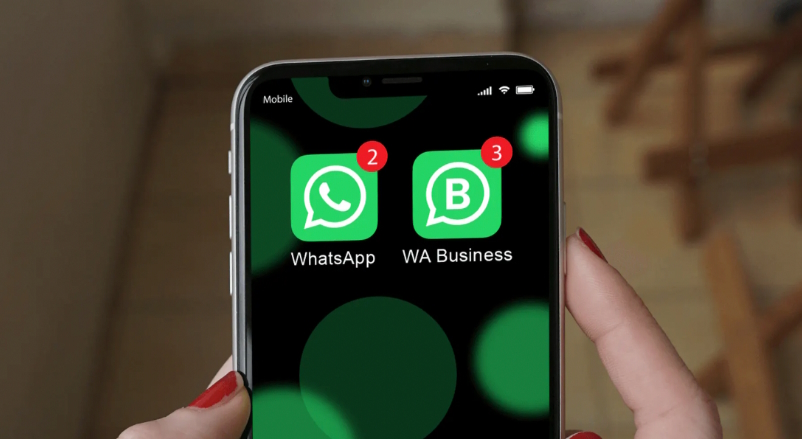
When you use a WhatsApp Business second phone number, you can have two numbers active on the same device. Use WhatsApp Messenger for friends and family, and WhatsApp Business for customers, vendors, and work contacts – without mixing the two.
Read our guide if you want to switch your existing WhatsApp account to WhatsApp Business.
Support multiple users when you assign virtual phone numbers to your team
WhatsApp Business works well for teams of different sizes – whether you’re a small business with two employees sharing customer inquiries or a growing team spread across multiple devices (such as real estate teams, contractors, or agencies). If a team member leaves, you can revoke access and reassign the number using our Teams feature, without the hassle of swapping SIM cards.
Save time with WhatsApp Business and a second virtual phone number
When WhatsApp Business runs alongside your personal WhatsApp on the same phone, you spend less time switching devices to keep up with messages. Setup is fast, too – it only takes a few minutes to get started.
Protect your privacy with WhatsApp Business
Using your personal phone number for business can lead to constant messages and blurred boundaries. With a dedicated WhatsApp Business number, customers only see your business contact – not your private number. You stay in control of your personal chats while managing everything from one device.
Access all the professional tools WhatsApp Business offers
Unlike WhatsApp Messenger, which is designed for personal use, WhatsApp Business is built specifically for small and medium-sized businesses. It’s a separate app with tools designed to streamline customer communication. Create a WhatsApp Business profile to build credibility and trust, and set up a catalog to showcase your products or services. Use Labels to organize conversations, and Quick Replies to respond faster to common questions.
Meet customers on a platform they already use
One of the biggest advantages of WhatsApp Business is that many of your customers already use WhatsApp daily. With more than 2 billion active users worldwide, it’s one of the most popular messaging apps globally. Research shows that 85% of people prefer messaging brands directly, which is why WhatsApp often outperforms slower channels like email. Engagement data supports this: 80% of messages are read within five minutes, and WhatsApp has an average open rate of 98%.
Build trust with customers using WhatsApp Business
WhatsApp is known for its strong anti-spam policies and security features, including tools to block and report suspicious accounts. Used responsibly, WhatsApp can help build customer trust and credibility. WhatsApp Business also uses end-to-end encryption, helping keep customer conversations private and secure.
Learn how to avoid a temporary WhatsApp Business account ban.
What WhatsApp Business looks like as a second number on your phone:
How can I manage more than one business number on WhatsApp?
While solo entrepreneurs and freelancers may only need one business number, companies with multiple employees – especially sales or customer support teams – often require several WhatsApp Business numbers. Here are a few options to consider:
WhatsApp Cloud
If your business has 50+ WhatsApp users, the paid WhatsApp API (WhatsApp Cloud) may be the right solution. This enterprise-level option allows you to manage WhatsApp conversations across multiple users from a shared platform, assign chats to team members, and more. It’s typically used by larger support teams.
Learn more about WhatsApp Cloud.
Trengo
Trengo is an omnichannel inbox that brings together email, WhatsApp Business, Instagram, and live chat, allowing teams to manage customer messages in one place.
Respond.io
Respond.io is another business messaging platform that works with the WhatsApp Business API, helping teams manage marketing, sales, and support conversations across multiple devices.
Note: YourBusinessNumber has not tested or endorsed these third-party platforms and is not affiliated with them. We recommend conducting your own research to ensure these solutions meet your business needs.
If you’re an SMB (1–50 employees), assigning virtual numbers to your team for WhatsApp Business is often a more affordable solution. And YourBusinessNumber Teams can help you get started today!
Use a virtual number with the WhatsApp Business app to keep costs low
There’s no need to invest in multiple devices to use WhatsApp Business with a separate business number. Simply generate your number, install WhatsApp Business, and start messaging.
With YourBusinessNumber, you can get a dedicated US phone number to use with popular messaging apps. There’s no need to change your phone – just download the free WhatsApp Business app from the Apple App Store or Google Play Store and sign up using the number we provide. The setup process is the same on iPhone and Android.
Who uses a virtual number for WhatsApp Business?
WhatsApp Business is a powerful tool for businesses looking to improve customer communication and save time. Here are a few examples of how US businesses use WhatsApp Business every day:
Real Estate Agents
WhatsApp Business is a strong fit for real estate teams. Multiple agents can respond quickly to buyers and sellers, schedule showings, manage conversations, and reference chat history – helping speed up transactions that rely on fast communication.
The result? Better service, faster responses, and more closed deals.
Small Business Owners
Many small business owners feel overwhelmed by daily customer messages – especially when multiple staff members are responding.
With WhatsApp Business, it’s easy to see which messages still need replies, without sorting through personal chats.
A complete Business Profile with your business name, phone number, website, and hours helps create a professional first impression. Away messages also help set expectations.
Personal Trainers
Personal trainers rely on strong client communication, and WhatsApp Business makes managing relationships easier.
Whether you’re training five clients or fifty, you can respond quickly and make free WhatsApp voice calls – all without juggling multiple devices.
Beauty Professionals & Hair Stylists
WhatsApp Business is ideal for beauty professionals and mobile hair stylists who want to streamline bookings and reduce missed inquiries. Use message templates, manage appointments, and promote offers – all from one app.
A dedicated business number also makes it easier to disconnect outside working hours.
Hotels & Restaurants
Hospitality businesses can use WhatsApp Business to answer questions, manage reservations, share information, and coordinate internally. While large chains may use the WhatsApp API, small and mid-sized teams often see great results using the WhatsApp Business app.
Consultants & Freelancers
Consultants and freelancers benefit from fast, organized communication. WhatsApp Business helps you manage clients using Labels, Quick Replies, and WhatsApp Web for document sharing and productivity.
Because clients often respond faster on WhatsApp than email, decisions and approvals move more quickly.
Contractors, Plumbers & Electricians
Contractors often rely on messaging to coordinate jobs and communicate with customers. WhatsApp Business makes it easy to share photos, confirm details, send quotes, and keep a full chat history – all from one phone.
Creative Professionals
Creative professionals like designers, photographers, and content creators often manage multiple clients at once. A dedicated WhatsApp Business number helps keep conversations organized as more clients prefer messaging over email.
With WhatsApp Web, you can stay connected while working on other tasks.
Remote employees (WFH)
Remote employees often struggle to maintain boundaries when using one number for both personal and work conversations.
WhatsApp Business helps separate work messages into a dedicated app, allowing employees to disconnect after hours – without employers needing to provide additional devices or roll out the WhatsApp API.
WhatsApp Business offers a modern communication solution for US businesses of all sizes – and with YourBusinessNumber, creating and managing numbers for teams is fast and simple.
Get started on WhatsApp Business with YourBusinessNumber
Need a new number to verify a WhatsApp Business account? A virtual second phone number from YourBusinessNumber is the ideal solution. In just minutes, you can run both WhatsApp Messenger and WhatsApp Business on the same device – without paying for another phone plan.
It takes just three clicks to receive your virtual number for WhatsApp or WhatsApp Business via SMS. If you need help, our support team is ready to guide you through setup so you can start using WhatsApp Business with confidence. Our flexible, low-cost plans keep you in control.
So why wait? Get started with your new number today.