



Essentials to know
- One grey tick indicates your message has been sent from your phone but hasn’t yet been delivered to the recipient, often due to poor reception, a flat battery, or network dropouts.
- Two grey ticks mean the message has been delivered to the recipient’s device, while two blue ticks indicate it has been read.
- A single grey tick does not automatically mean you’re blocked; other signs include being unable to see last seen, profile updates, or make calls.
- Read receipts (double blue ticks) can be disabled in WhatsApp Business settings, though turning them off also stops you from seeing read receipts from others.
- For group messages, double blue ticks only appear once every participant has read the message; a clock icon or no ticks usually indicates a connection issue.
💡 Did you know?
According to the Australian Communications and Media Authority (ACMA), 83% of Australian adults use messaging and calling apps (with 43% of metro Australians using WhatsApp weekly). Meanwhile, WhatsApp Business benchmarks show that 80% of messages are read within 5 minutes – meaning keeping your read receipts switched on and replying promptly once those double blue ticks appear is one of the simplest ways for Aussie small businesses to build instant trust.
Only seeing one tick on your WhatsApp message rather than two generally means your message has left your phone and reached WhatsApp’s servers, but has not landed on the recipient’s handset yet. They might be on a flight, out of mobile reception in regional areas, have their phone switched off, or – potentially – have blocked you. Don’t stress just yet, though: there’s plenty going on behind the tick numbers and colours on WhatsApp.
The double-tick system is genuinely handy because you can check the delivery status of every quote, booking confirmation, or invoice follow-up you send on WhatsApp Business at a glance. With read receipts enabled, your customers can also see when you’ve had a chance to open their message – which is especially useful for managing expectations during busy trading periods, public holidays, or after knock-off time.
In short, both WhatsApp Messenger and WhatsApp Business use the Read Receipt system to show when a message is delivered and whether the recipient has opened it. Whenever you send a message, at least one checkmark appears alongside the timestamp. By paying attention to the colour and number of those ticks, you can quickly see what’s happening – starting with that single grey tick.
So, how do you decode every checkmark status on WhatsApp Business? Let’s break down single ticks, double ticks, and what it means when no ticks appear at all.
What does a single grey tick mean on WhatsApp?
One grey tick means your message has been successfully sent from your phone, but hasn’t been delivered to the other person’s device yet. Think of it as sitting ‘in transit’. If your customer or supplier can’t receive messages – for example, while they’re flying interstate or working on a site with patchy mobile reception – a single grey tick can remain for hours.
There are plenty of everyday reasons you might see a single grey tick, such as weak mobile reception or Wi-Fi on their end, a flat battery, or their phone being switched off. Your contact may also have logged out of WhatsApp or uninstalled the app.
Does one grey tick on WhatsApp mean I’m blocked?
A single grey tick can mean someone has blocked your number, though it’s far from the only explanation.
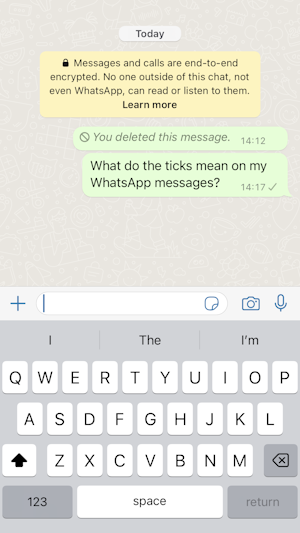
If a recipient has blocked you, your messages will only ever show one grey checkmark (sent) and never progress to a second checkmark (delivered).
WhatsApp won’t notify you if you’ve been blocked, but a few clues usually appear together: you can no longer see the person’s online or last seen status, updates to their profile photo won’t load, and WhatsApp voice or video calls to their number won’t connect. WhatsApp intentionally avoids confirming blocks outright to protect user privacy, so there’s no guaranteed way to prove it.
What is the difference between one grey tick and two on WhatsApp?
One grey tick confirms the message has been sent from your phone to WhatsApp, while two grey ticks confirm it has been delivered to the recipient’s phone or one of their linked devices (such as WhatsApp Desktop or a companion tablet).
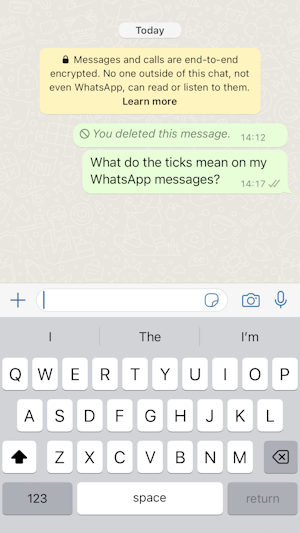
What does two blue ticks mean on WhatsApp?
Two blue ticks mean your message has been delivered and opened by the recipient.

💬 Expert Top Tip
“If you’re in the middle of a job and only want to glance at a customer’s message without triggering the double blue ticks before you’re ready to reply, read it from your phone’s lock-screen notification banner or pull down your notification shade – or long-press the chat in WhatsApp on iPhone to preview it. That way, your customer doesn’t feel ignored while you finish what you’re doing, and you can open the chat properly once you have time to give them a full answer.”
My contact has read the message but the double ticks are still grey – why is this?
If your customer or contact has turned off Read Receipts in their privacy settings, the two ticks stay grey even after they’ve opened and read your message.
What does one grey and one blue tick mean on WhatsApp?
Strictly speaking, WhatsApp shouldn’t display one grey tick and one blue tick side by side – both checkmarks are designed to turn blue simultaneously the moment a message is read.
If you consistently see one grey and one blue tick, it’s likely a temporary display glitch; try updating the app or contacting WhatsApp support if it persists.
How do I turn off double ticks on WhatsApp Business?
Fair enough – sometimes you don’t want clients knowing the exact second you’ve opened a message while you’re pricing up a quote or between appointments. While you can’t disable delivery ticks altogether, switching off double blue ticks in WhatsApp Business takes seconds.
Open WhatsApp Business, go to Settings > Privacy, and toggle off Read Receipts. Once disabled, your ticks remain grey even after you read incoming messages.
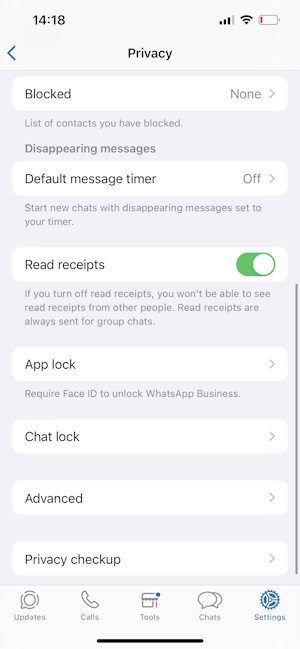
Keep in mind that read receipts work both ways: if you switch yours off, you won’t see blue ticks when customers read your messages in one-on-one chats either. In group chats, read receipts always remain active regardless of your settings.
Should I turn off read receipts on WhatsApp Business?
Honestly, we’d recommend leaving them on. While disabling double blue ticks can feel like it buys you breathing room, hiding read receipts often leaves customers wondering whether their quote request or booking change has actually been seen.
Keeping read receipts active uses simple customer psychology to your advantage. One of the biggest perks of messaging over email is immediacy and transparency – when a customer sees those double blue ticks, they know a real person has seen their enquiry, which builds confidence and credibility.
If you’re flat out on a job and can’t type a detailed reply right away, set up WhatsApp Business Quick Replies or an automated away message so customers know you’ve received their note and will get back to them shortly.
How do double blue ticks work in group messages?
In a group chat – such as a project thread with a client, builder, and supplier – two grey ticks appear once every member has received the message, and the double blue ticks only show up once every single participant has read it.
What does it mean if I don’t have any ticks next to my WhatsApp message?
If you see a small clock icon instead of ticks, your message hasn’t left your phone yet – usually because your mobile data or Wi-Fi has dropped out. Check your signal, toggle airplane mode off and on, or refresh WhatsApp once you’re back online.
| Tick Icon | Status | What It Means for Your Business |
|---|---|---|
| Clock icon (🕒) | Sending | The message hasn’t left your phone yet – check your Wi-Fi or mobile reception. |
| One grey tick (✓) | Sent | Message reached WhatsApp’s servers, but hasn’t landed on the recipient’s handset yet (phone off, out of range, or blocked). |
| Two grey ticks (✓✓) | Delivered | Message has arrived on the customer’s phone or linked device, but hasn’t been opened yet (or Read Receipts are off). |
| Two blue ticks (✓✓) | Read | The customer has opened and seen your message (in group chats, only appears once every member has read it). |
Once you understand how WhatsApp’s ticks and read receipts work, it’s much easier to manage customer expectations – especially when you keep work chats separate from your personal inbox. Mixing client quotes and delivery updates with family messages makes it far too easy to accidentally open a customer message before you’re ready to reply, triggering those double blue ticks and putting you under pressure after knock-off time.
Separate work from personal on WhatsApp and WhatsApp Business
Get a dedicated Australian virtual number for WhatsApp Business in minutes – no second handset or long-term telco contract required.
To manage notifications, read receipts, and client enquiries cleanly between work and downtime without carrying a second mobile, give WhatsApp Business a go. You can run it alongside your personal WhatsApp on the exact same phone, and with an Australian virtual number for WhatsApp or WhatsApp Business from YourBusinessNumber, setup takes just minutes.