



Essentials to know
- A second phone number is required for WhatsApp Business if you already use WhatsApp Messenger, making it essential for separating work and personal chats.
- Using a second number keeps business and private messages fully separate, helping improve focus, privacy and work–life balance without carrying two phones.
- It’s a cost-effective set-up – no need for a second handset or SIM contract, just a virtual number or eSIM on the same device.
- WhatsApp Business unlocks professional tools like business profiles, quick replies, labels and catalogues to improve customer communication and efficiency.
- Ideal for individuals and teams alike, allowing multiple users, easier handovers, and scalable communication as your business grows.
Want to upgrade your business comms strategy? It’s time to consider setting up a WhatsApp Business account with a second virtual phone number. This powerful combination comes with plenty of benefits for Australian small businesses, including stronger privacy, better separation between work and personal chats, the ability to support multiple users, and helping you improve your work-life balance.
In this article, we’ll take a closer look at the benefits of using a second number for WhatsApp Business, plus the best options for managing multiple numbers at the same time.
Why should I have a second number for WhatsApp Business?
It’s not possible to register two WhatsApp accounts with the same phone number. So if you already use WhatsApp Messenger on your phone, you’ll need a second number to set up the WhatsApp Business app.
That’s where YourBusinessNumber comes in. We make it easy for Australian businesses to get a second phone number for professional use. In just three clicks, we’ll generate a brand-new number and send it to you via SMS, ready to verify on the WhatsApp Business app.
The benefits of using WhatsApp Business with a second virtual phone number
Using a second phone number for WhatsApp Business comes with a wide range of benefits – from improving your work-life balance to saving time and money. Here are some of the biggest advantages:
Save money by using WhatsApp Business with a second phone number
Using WhatsApp Business with a second number is cost-effective because it removes the need to buy a second handset or pay for a separate mobile plan. You don’t need to manage two phones – but you still get a completely separate WhatsApp Business app for work.
Keep your work and personal messages separate with a second phone number
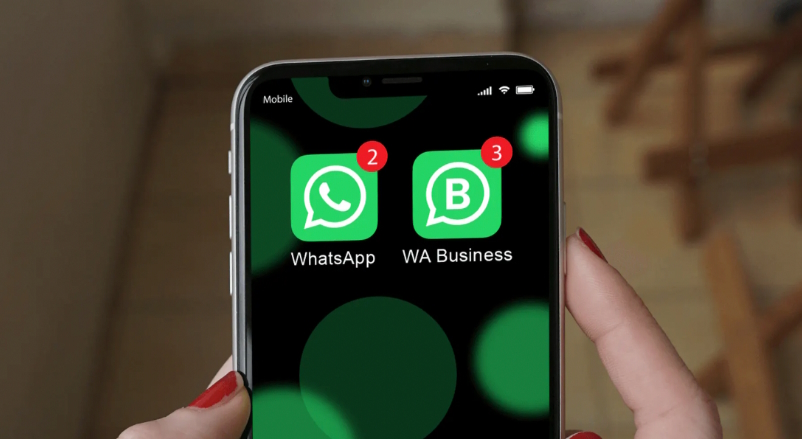
When you use a WhatsApp Business second phone number, you can have two numbers active on the same device. Use WhatsApp Messenger for family and friends, and WhatsApp Business for customers, suppliers and work contacts – without mixing the two.
Read our guide if you want to change your current WhatsApp account to a WhatsApp Business account.
Manage multiple users when you buy virtual phone numbers for your team
WhatsApp Business can work well for multiple users in teams of different sizes – whether you’re a small business with two staff members sharing customer enquiries, or a larger team spread across multiple devices (for example, property managers, tradie businesses or agencies). If a team member leaves, you can remove access and reassign the number to someone else using our Teams feature, without the hassle of swapping SIM cards.
Save time with WhatsApp Business and a second virtual phone number
When WhatsApp Business is set up alongside your personal WhatsApp on the same phone, you spend less time switching devices to stay on top of messages. Set-up is quick too – it only takes a few minutes to get started.
Maintain your privacy with WhatsApp Business on your phone
Using your personal number for business can lead to constant messages and blurred boundaries. With a dedicated WhatsApp Business number, customers only see your business contact – not your private number. You keep your personal chats private while still managing everything from one device.
Harness all the professional tools that WhatsApp Business has to offer
Unlike WhatsApp Messenger, which is designed for personal use, WhatsApp Business is built with small-to-medium businesses in mind. It’s a separate app and includes helpful tools to make customer communication more efficient. Set up a WhatsApp Business profile to strengthen your brand and build trust, and create a Catalogue to showcase products or services. Use Labels to organise your chats and keep your inbox under control, and Quick Replies to respond quickly to common customer questions.
Use your customers’ preferred platform for communication
One of the biggest benefits of WhatsApp Business is that many of your customers already use WhatsApp day-to-day. With a reported 2 billion active users worldwide, WhatsApp is one of the most widely used messaging apps on the planet. Research shows that 85% of people choose to message brands directly, which is why so many customers prefer WhatsApp over slower channels like email. It’s also reflected in engagement data: 80% of messages are read in the first five minutes and WhatsApp has an average open rate of 98%. That can mean better engagement and faster customer conversations.
Use WhatsApp Business to build trust with your customers
WhatsApp is known for its strong anti-spam approach and security protections, including tools to block and report suspicious accounts. Used responsibly, WhatsApp can help your business build trust and credibility. WhatsApp Business also uses end-to-end encryption, helping keep customer chats private and secure.
Find out how to avoid getting a temporary WhatsApp Business account ban.
What WhatsApp business looks like as a second number on your phone:
How can I manage more than one business number on WhatsApp?
While sole traders, freelancers and self-employed people may only need one business number, businesses with multiple staff – especially customer service or sales teams – often need several WhatsApp Business numbers. Here are some options to consider:
WhatsApp Cloud
If you’re running a business with 50+ WhatsApp users, the paid WhatsApp API (WhatsApp Cloud) may be the right fit. This enterprise option lets you manage WhatsApp messages across multiple users in a shared platform, assign chats to team members, and more. It’s commonly used by larger support teams.
Find out more about WhatsApp Cloud.
Trengo
Trengo is an omnichannel messaging platform that brings different communication channels into one inbox. It can combine email, WhatsApp Business, Instagram and live chat so you can manage customer messages in one place.
Respond.io
Another option is Respond.io, a business messaging platform that works with the WhatsApp Business API to connect customers from multiple channels to your team. It’s designed to support marketing, sales and support workflows with multiple users and devices.
Find out more about Respond.io.
Note: YourBusinessNumber has not tested these third-party apps, and is not affiliated with them. You are advised to carry out your own research to check that these solutions meet your requirements before using these apps.
If you are an SME (1-50 employees) then you may find using virtual numbers to assign your team to WhatsApp Business is a more affordable solution. And YourBusinessNumber Teams can help you today!
Use a virtual number for WhatsApp Business app to keep costs and effort low
There’s no need to spend money on multiple devices if you want to use the WhatsApp Business app with a separate business number. Just follow a simple process: generate your number, install WhatsApp Business, and start messaging.
With YourBusinessNumber, you can get a dedicated Australian number to use with popular messaging apps. You don’t need to change your phone either – simply download the free WhatsApp Business app from the Apple App Store or Google Play Store and sign up using the number we provide. The steps are the same for iPhone and Android.
Who uses a virtual number for WhatsApp Business?
WhatsApp Business is a game changer for businesses that want more efficient customer communication and a better return on their time. Here are a few examples of how Australian businesses use WhatsApp Business day-to-day:
Estate Agents
WhatsApp Business API can be a great fit for real estate agencies. Multiple agents can respond quickly to buyers and sellers, arrange inspections, manage multiple users and numbers, refer back to chat history, and speed up a process that often relies on back-and-forth communication.
The result? Better service, faster response times and more sales. As a bonus, we can set up multiple team members with multiple phone numbers for WhatsApp Business, so the whole agency can work smoothly.
Small Business Owners
Many small business owners feel overwhelmed by the number of messages they receive each day – especially if there are multiple contact points or staff members replying to customers.
With the WhatsApp Business app, you can quickly see which messages still need a response without needing extra devices or digging through personal chats.
Make a strong first impression by setting up a personalised Business Profile with your business name, phone number, website and trading hours. You can also use away messages so customers know when to expect a reply.
Personal Trainers
For personal trainers, staying on top of customer relationships is essential – and WhatsApp Business makes it easier to manage client communication.
Whether you’re working with five clients or twenty-five, you can respond quickly to incoming messages and make free WhatsApp voice calls without relying on multiple devices.
YourBusinessNumber helps you avoid juggling two phones, so you can keep costs down and stay organised.
Beauty Therapists & Hairdressers
WhatsApp Business can be ideal for beauty therapists and mobile hairdressers who want to streamline bookings and reduce missed enquiries. Manage appointments, answer common questions with templated messages and promote special offers to existing customers.
Having a dedicated work number and a separate business app also makes it easier to switch off outside business hours, supporting a healthier work-life balance.
Hotels & Restaurants
WhatsApp Business is a powerful tool for hospitality businesses. Large chains may benefit from the WhatsApp Business API, but small-to-medium teams can still get excellent results using the WhatsApp Business app with a dedicated business number.
Hotel and restaurant teams can use WhatsApp Business to answer questions, share details, manage bookings and coordinate with staff. WhatsApp can also be useful for internal team communication, helping teams stay aligned without constant phone calls.
Consultants & Freelancers
For consultants and freelancers juggling multiple clients and projects, fast and clear communication is key. With WhatsApp Business, you can use Quick Replies for common questions, Labels to organise chats by client or project, and WhatsApp Web to stay productive and share documents easily.
Because many clients respond faster on WhatsApp than email, you can speed up approvals, feedback and decision-making.
Builders, Plumbers & Electricians
Tradespeople often rely on messaging to stay in touch with customers and coordinate jobs. WhatsApp Business is great for sharing photos – whether a customer needs to send a picture of an issue, or you want to confirm materials, measurements or site details.
Trades can use WhatsApp Business to respond quickly, keep a record of chat history and send quotes or estimates, all from one phone.
Creatives
Creative professionals – like copywriters, graphic designers, photographers and content creators – often juggle multiple projects and clients. A dedicated WhatsApp Business number can help keep client chats organised, especially as more customers prefer to communicate through messaging.
With WhatsApp Web, you can set up quickly using a QR code and stay connected to WhatsApp Business while working on other tasks.
Employees who work from home (WFH)
Employees who work remotely can find it difficult to maintain boundaries if they’re using the same number for personal chats and work conversations.
With WhatsApp Business in a separate app, staff can keep work and personal life separate and switch off outside business hours – without employers needing to pay for multiple devices or roll out WhatsApp API for everyone. It’s easy for employees to install the WhatsApp Business app, and for businesses to manage numbers across teams.
WhatsApp Business offers a modern communication solution for Australian businesses of all sizes – and with YourBusinessNumber, generating new numbers for multiple users is quick and simple.
Get started on WhatsApp Business with YourBusinessNumber
Need a new number to verify a WhatsApp Business account? A virtual second phone number from YourBusinessNumber is an ideal solution. In minutes, you can set up both WhatsApp Messenger and WhatsApp Business on the same device and enjoy clearer work-life boundaries – without paying for a second phone plan.
It only takes three clicks to get your new virtual number for WhatsApp or WhatsApp Business delivered via SMS. If you need a hand, our customer service team can help you get set up so you can start using WhatsApp Business confidently. Plus, our flexible, low-cost subscriptions keep you in control.
So why wait? Get started with your new number today.